
Trackman Golf
TrackManSports
4.7258.00 Reviews
- Version
- 5.4.10
- Installs
- 500.00K
- Age Rating
- Everyone
Screenshots
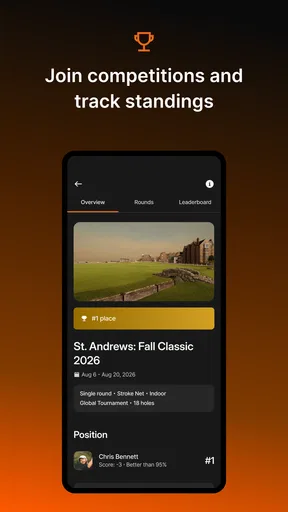
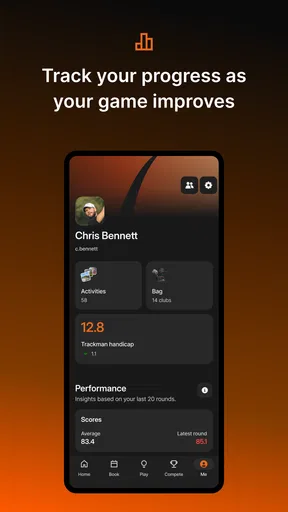
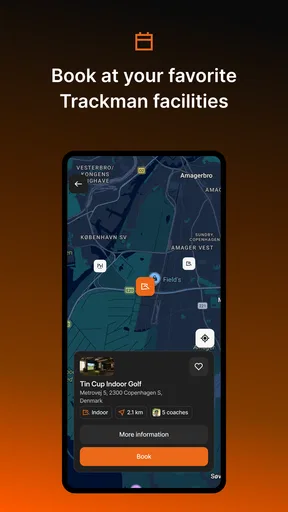
Our Review of Trackman Golf
 Analysis by Appyee
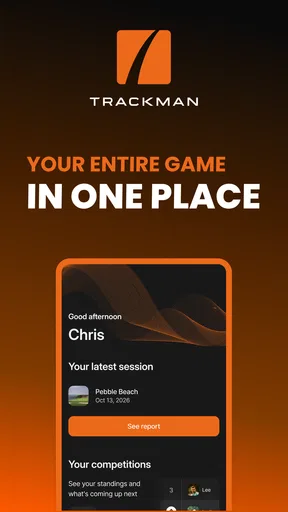
Trackman Golf is a sports app from TrackMan that brings your TrackMan activities together in one place. I found it most useful when I treated it as a companion to an existing TrackMan experience rather than as a standalone golf game or a replacement for a range session. That distinction matters: the app makes more sense when you already use TrackMan equipment or visit a facility where TrackMan is part of the practice or playing setup.
The app is free, rated for Everyone, and available for Android devices running at least Android 9. Its current version is 5.4.10. With a 4.7 average from around nineteen thousand ratings and over half a million installs, it has clearly found an audience among golfers who want their TrackMan-related activity organized digitally. I still think the best way to judge it is by asking a practical question: does it help you get from arriving at a TrackMan session to understanding what happened afterward?
What to expect before you begin
The first thing I would tell a new user is not to expect a general-purpose golf instruction app. Trackman Golf is not designed to replace a coach, a full golf simulator, or the feeling of hitting balls outdoors. Its role is narrower and more useful: it acts as a central place for activities connected with TrackMan. That makes it especially relevant if your club, practice venue, or event already uses the developer’s technology.
That focus is also the app’s main strength. Instead of treating every practice visit as an isolated memory, I could use the app as a starting point for finding and revisiting TrackMan-related activity. The value grows when I use it repeatedly, because a single session tells me what happened once, while a series of sessions can help me notice patterns in my own practice habits.
There is an important trade-off here. A golfer who simply wants a basic scorecard, a swing timer, or a broad collection of instructional videos may find more immediate value in a conventional golf app. Those alternatives are often built around one clear personal tool. Trackman Golf makes more sense for someone whose golf life already intersects with TrackMan and who wants that connection handled in an organized way.
I also like that the app is free to download. That lowers the barrier to trying it, although “free” does not mean it can create a complete TrackMan experience by itself. The surrounding venue, equipment, or activity still matters. I would install it before visiting a TrackMan-enabled location, not after the session has already started, so I have time to become familiar with the sign-in flow and the way the app presents activity.
Who will get the most from it
The strongest audience is a golfer who practices regularly at a TrackMan-equipped facility, joins sessions where TrackMan is used, or wants one place for TrackMan activities instead of relying on scattered notes and screenshots. It can also suit a newer golfer who feels overwhelmed by technical golf software, because the app’s purpose is more focused than a large training platform with many unrelated tools.
More experienced players may appreciate it for a different reason. Once a golfer has a routine, the challenge is often not finding another tip but keeping practice connected to a purpose. I found the app more useful when I opened it with a question in mind, such as whether I was returning to a previous activity or preparing for another visit. That small change prevented me from treating it as something to browse without a plan.
I would skip it if I never encounter TrackMan in my normal golf routine. Installing it in that situation may leave you wondering what to do next, because its usefulness depends on the activities around it. I would also choose a dedicated golf GPS or scorekeeping app if my only goal were course navigation or recording a casual round. Those tools are designed for that job first; this one is designed around TrackMan.
Setting up the app without unnecessary friction
My advice for the first setup is simple: install it before you need it, open it on a reliable connection, and take a moment to understand the account or activity path rather than rushing through the first screen. The exact experience can depend on where and how you use TrackMan, so the most reassuring approach is to have the app ready before you arrive at the range or venue.
Keep the name you use consistent with the name associated with your TrackMan activity. This is a small but important habit. If you use one name in the app and another when joining a session, it becomes harder to recognize your own activity later. I would also avoid creating multiple accounts simply because the first screen feels unfamiliar. First-time confusion is often easier to solve by checking the sign-in details you already use than by starting over.
The app is not something I would recommend testing for the first time while a group is waiting for a bay or tee-time activity to begin. A few minutes spent at home can make the actual visit calmer. Open the app, look through the available areas, and make sure you know where you would return after completing an activity. That preparation is more valuable than trying to memorize every menu.
Another useful habit is to keep the app updated through the normal app-store process. TrackMan lists the current version as 5.4.10, and staying current is sensible for an app that connects your personal use with activities at a venue. I would not assume that an update changes the way every location works, but an outdated app is an avoidable source of trouble when you are trying to join or review something at a specific time.
Because the app is rated for Everyone, it is approachable for a broad audience, including families and younger golfers using it with an adult’s guidance. That rating does not make the setup automatically self-explanatory, though. A beginner may still need help understanding the difference between the app itself and the TrackMan-enabled activity taking place elsewhere. Explaining that relationship early prevents the common expectation that the phone alone will provide all the golf data.
A practical first-visit routine
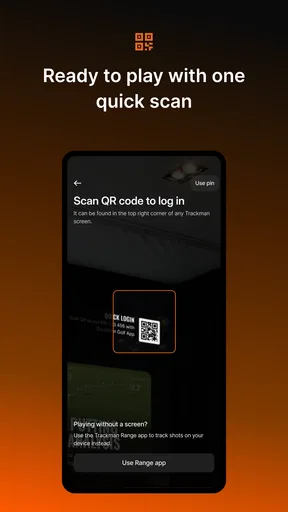
For a first visit, I would use this order: open the app before leaving, confirm that I can sign in, check what activity or location information is available, and only then head to the venue. Once there, I would follow the facility’s instructions rather than trying to invent a separate workflow inside the app. If staff provide a code, session name, or other joining detail, I would enter it carefully and check the result before beginning to hit shots.
This routine also answers a question many new users have: do you need to understand golf technology before using the app? In my experience, no. You need to understand the practical connection between your phone and the TrackMan activity, but you do not need to be an expert in launch data or swing analysis just to get started. Begin with identification and session access; explore the deeper information only after you know where your activity is stored.
If something does not appear immediately, I would first check the obvious causes: the account, the selected activity, the venue instructions, and the connection. I would not repeatedly tap through unrelated menus or create another profile. That usually adds confusion rather than solving the original problem.
Getting to the first meaningful success
The first successful action should be modest. I would define it as opening Trackman Golf, reaching the correct TrackMan activity, and being able to recognize my own session afterward. That is a better first goal than trying to interpret every available piece of golf information in one visit. Once the activity is correctly connected, the rest of the experience becomes much easier to understand.
In a realistic scenario, imagine arriving at an indoor practice venue after work with only a short amount of time. Instead of opening the app for the first time in front of friends, I would already be signed in and ready to locate the relevant activity. After the session, I would use the app to return to what I did rather than relying on memory. The meaningful success is not merely launching the app; it is leaving with a clearer record of that practice visit.
That workflow is especially helpful for golfers who tend to practice without a clear follow-up. I often find that the most useful moment comes after the excitement of hitting has passed. Looking back at the activity can help me decide what to work on next, whether that means repeating a drill, discussing the session with a coach, or simply booking another focused practice rather than hitting random clubs.
One non-obvious tip is to decide your review question before opening the activity. Ask whether you are checking consistency, preparing for another session, or trying to remember what happened with a particular club. Without a question, technical information can become noise. With one, the app becomes a reference point. This is where I think Trackman Golf can be more valuable than a notebook: it keeps the activity connected to the TrackMan environment instead of leaving you with a vague sentence such as “my irons felt better today.”
A second useful insight is to separate the session itself from the later reflection. During practice, I would avoid spending every minute staring at the phone. Use the app to get situated, then concentrate on the golf. Afterward, return to the activity with a calmer mind. This reduces the temptation to change your swing based on one hurried glance and makes the app serve your practice rather than interrupt it.
Turning one session into a repeatable habit
For a repeat visit, I would use the previous activity as a reference rather than as a target that must be copied perfectly. Golf conditions, fatigue, warm-up time, and the purpose of the session can all change. The app can help you remember what you did, but it cannot decide whether a difference is meaningful in your particular situation. That judgment still belongs to you or your coach.
Families and casual groups can use the same approach. One person can prepare the app while another organizes the venue details, then everyone can focus on taking turns. For a coach-led session, the app is most useful when it supports the lesson’s objective instead of competing with it. I would ask the coach which part of the activity deserves attention and use that guidance to avoid chasing every number or screen.
This is also where the app compares favorably with paper notes. Notes are quick, personal, and available anywhere, but they depend on remembering to write them and describing the session accurately. Trackman Golf is better when the activity already exists within TrackMan and you want a more direct way to return to it. Paper remains better for personal observations such as confidence, fatigue, or a change in grip—details a digital activity record may not capture in the way you want.
Where new users can become confused
The biggest possible misunderstanding is assuming that the app itself is the complete source of the TrackMan experience. It is better understood as the app layer around TrackMan activities. If you open it at home without a relevant session or venue connection, the experience may feel less useful than expected. That is not necessarily a fault; it is a sign that the app’s purpose is tied to how TrackMan is being used around you.
A second point of confusion is the difference between finding an activity and understanding it. Locating a session is a practical achievement, but interpreting golf information requires context. A single practice can be affected by warm-up, club choice, swing changes, and the reason you were practicing. I would resist making a major equipment or technique decision from one visit. Use the app to support a pattern, not to manufacture certainty.
Another trade-off concerns convenience. A dedicated scorecard app may open directly into course details, while Trackman Golf may require you to think about the relevant TrackMan context first. Conversely, a broad golf platform can feel cluttered with social features, course tools, and training content that you do not need. Trackman Golf’s narrower focus is cleaner when it matches your use case, but less flexible when it does not.
If an activity seems missing, I would check whether I am using the correct account and whether the venue’s activity has been associated with me in the expected way. I would also ask the facility staff for the correct process before assuming the app is malfunctioning. This is one of those situations where local instructions matter, and guessing can waste more time than asking a quick question.
Battery and attention are practical considerations too. I would not keep the display open throughout an entire practice session unless I had a specific reason. The golf itself should remain the priority. Opening the app at the beginning and reviewing it afterward is often a better balance than treating the phone as a constant dashboard.
When another app is the better choice
If your main need is GPS distance information during an outdoor round, choose a golf GPS app. If you want a simple scorecard shared with playing partners, choose a scorekeeping tool. If you want a large library of lessons independent of any facility, choose an instructional platform. Trackman Golf is not the universal answer to those needs, and I would rather be clear about that than recommend it simply because it carries a familiar golf name.
It is also not the best first choice for someone who does not have access to TrackMan activities. The free price makes trying it easy, but the app’s value is still situational. In my view, that is the central decision: do you want a general golf utility, or do you want a practical companion for TrackMan use? If the second description fits, the app deserves a place on your phone.
What to do after the first session
After the first successful activity, I would not immediately explore every corner of the app. Instead, return to the same activity once, confirm that you can recognize it, and note what you actually found useful. Maybe the important benefit is remembering a practice session, preparing for another visit, or keeping TrackMan activity in one place. Knowing that will help you build a routine that feels natural.
My third concrete tip is to create a simple personal review habit: after each TrackMan visit, write down one sentence outside the app about what you intended to practice and one sentence about what you would change next time. The app supplies the activity context, while your own note supplies the human context. Together they are more useful than either one alone. This also protects you from overreacting to technical information without considering how the swing felt.
For a golfer working with a coach, bring specific questions to the next lesson instead of presenting a pile of disconnected sessions. For a casual player, use the app to make the next practice more intentional. For a facility regular, the benefit may be cumulative organization: each visit becomes easier to place in the larger story of your golf rather than disappearing when you leave.
Trackman Golf has been available since September 20, 2017, and its continued presence alongside a strong average rating suggests that its focused purpose resonates with many users. I would not interpret that as a promise that every golfer will enjoy it. The app is most convincing when the surrounding TrackMan experience is already part of your routine.
My final recommendation is straightforward: install it if you use TrackMan, prepare it before your first venue visit, and judge it by how easily it helps you return to a meaningful activity. Its real strength is not replacing golf practice, but making TrackMan practice easier to begin, revisit, and use with intention. For that audience, Trackman Golf is a sensible free companion from TrackMan. For golfers looking for navigation, general instruction, or a standalone game, a different category of app will probably serve them better.
Verdict
Strengths of Trackman Golf
- Accurate shot tracking helps players understand distance and club performance.
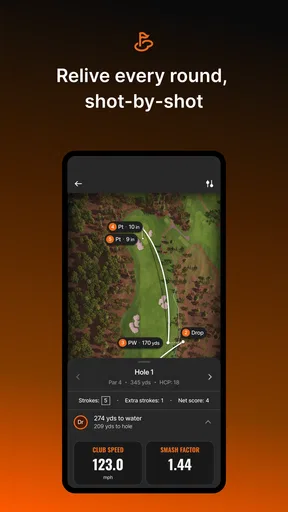
- Detailed course maps make planning each shot easier during a round.
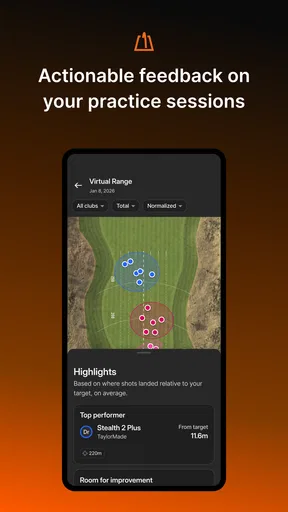
- Practice features support focused training away from the course.
- Clean interface keeps key performance data easy to find.
- Useful for golfers who want consistent, data-driven improvement.
Limitations of Trackman Golf
- Many advanced features require compatible TrackMan equipment.
- The app may feel excessive for casual golfers seeking simple scorekeeping.
- Performance insights depend on accurate setup and reliable shot data.
- Some courses or features may not be available in every region.
- Hardware and subscription costs can make the full experience expensive.
Similar Picks in This Category
View All
BeSoccer: Soccer Live Score
BeSoccer apps4.3

Cricbuzz - Live Cricket Scores
Cricbuzz.com3.7

NFL
NFL Enterprises LLC2.4

Da Fit
MO YOUNG LIMITED3.6

ESPN
Disney4.5

LiveScore: Live Sports Scores
LiveScore Limited4.5
Frequently Asked Questions
What is TrackMan Golf, and what can I do with the app?
TrackMan Golf is a companion app for golfers who use TrackMan technology at a driving range, indoor simulator, or personal practice setup. It can display shot data such as distance, ball speed, launch information, and dispersion, depending on the connected TrackMan system. The app may also support practice sessions, virtual courses, game modes, performance history, and other features designed to make training more measurable and engaging.
Do I need a TrackMan device or facility membership to use TrackMan Golf?
Many of the app’s most useful features depend on access to compatible TrackMan hardware, such as a range unit, simulator, or launch monitor installed at a participating venue. Some content may be viewable without a device, but shot tracking, real-time statistics, and simulator functions generally require a connection and, in some cases, a facility booking or account. Availability can vary by venue, subscription, and region.
Which phones and tablets are compatible with TrackMan Golf?
TrackMan Golf is designed for supported Android and iOS devices, but compatibility can depend on the operating system version, screen size, Bluetooth or Wi-Fi capabilities, and the specific TrackMan setup being used. Before downloading, check the application store listing for current requirements. Keeping both the app and your device software updated is also recommended, since older phones may experience connection or performance limitations.
Can TrackMan Golf help me improve my golf game?
The app can be a valuable practice tool because it presents objective feedback instead of relying only on feel. By reviewing carry distance, club speed, launch characteristics, shot shape, and dispersion, golfers can identify consistency issues and compare sessions over time. However, the app does not replace professional coaching. Data is most helpful when you understand the measurements and use them with a structured practice plan.
Is TrackMan Golf free to download, and are there additional costs?
The application may be available to download at no initial cost, but access to certain features can require a TrackMan account, a paid subscription, a simulator package, or payment for time at a participating golf facility. Costs depend on the venue, region, and services included with the connected system. It is worth checking the app listing and the facility’s pricing before booking a session or purchasing extra content.
